
Every time you type a prompt into Copilot, Microsoft Copilot Azure AI technology is quietly doing the heavy lifting. Copilot looks like a simple chat box inside Word, Teams or Windows, but behind that box sits a full Azure AI stack large language models, grounding data, identity checks and safety filters all running on Microsoft’s cloud. This guide breaks down exactly how Microsoft Copilot uses Azure AI behind the scenes, step by step, in plain English.
Understanding this architecture is also genuinely useful exam prep. Several of these concepts cloud services, AI workloads, and Microsoft’s responsible AI principles show up directly in the AZ-900 Certification Training syllabus.
What Is Microsoft Copilot?
Microsoft Copilot is an AI assistant built into Microsoft 365 apps such as Word, Excel, Outlook, Teams and Windows. It can draft emails, summarise meetings, build spreadsheets, and answer questions about your own files. But Copilot itself does not contain the intelligence it is a front-end experience connected to a much larger system of Azure AI services running in the background.
What Is Azure AI?
Azure AI is Microsoft’s collection of cloud-based artificial intelligence services, including language models, vision, speech, and search. It runs on Microsoft’s global network of Azure data centres and gives developers and products like Copilot access to powerful AI models without needing to build or train them from scratch.
How Microsoft Copilot Uses Azure AI Behind the Scenes
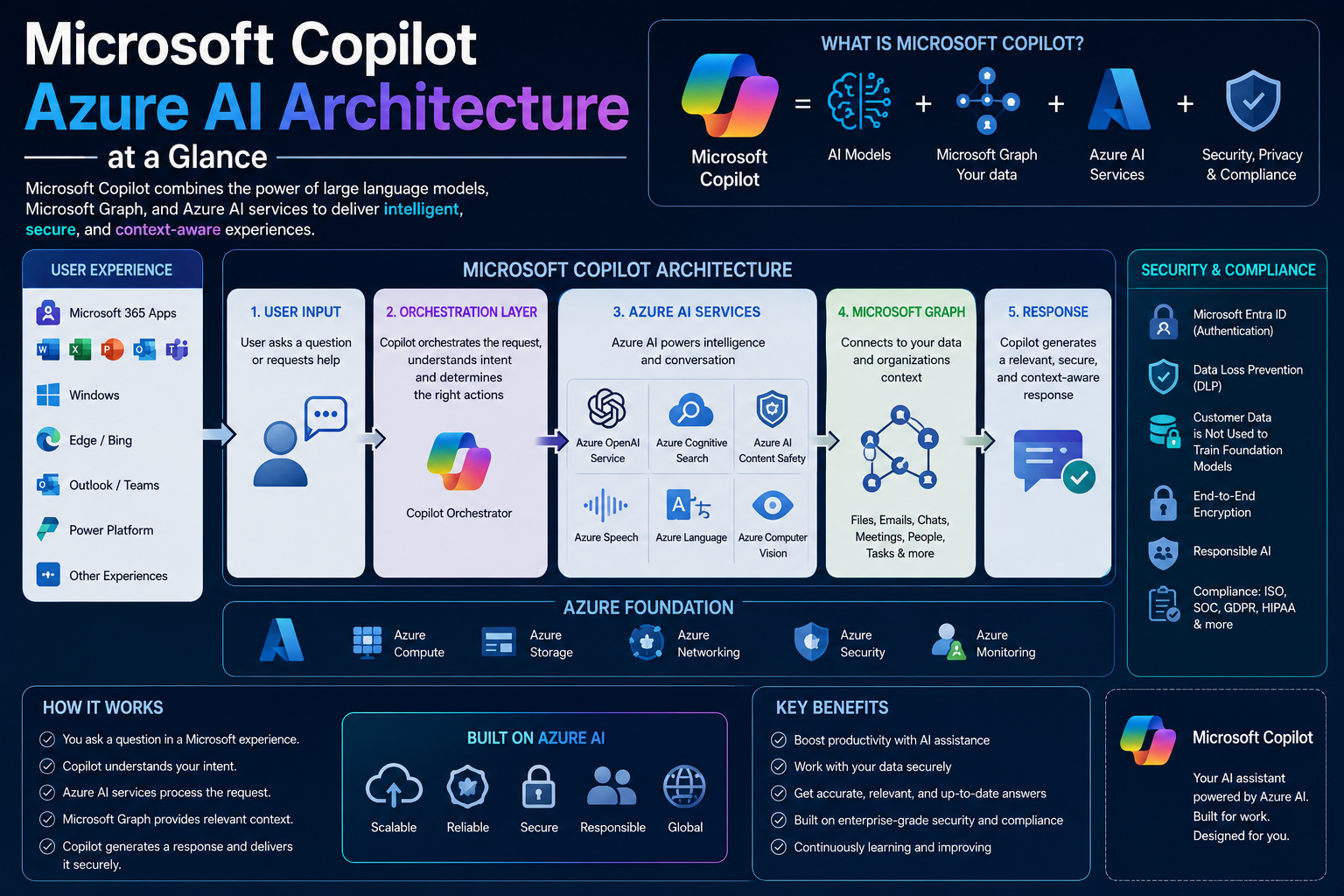
When you send a Copilot prompt, several Azure AI components activate in sequence. Here is the process broken down layer by layer.
1. Azure OpenAI Service Powers the Language Model
At the core of Microsoft Copilot Azure AI architecture sits the Azure OpenAI Service, which hosts large language models (LLMs) such as GPT. This is the component that actually reads your prompt, understands intent, and generates a natural-language response.
2. Microsoft Graph Supplies Your Business Context
Copilot needs to know about your emails, documents, calendar and chats to give relevant answers. Microsoft Graph is the API layer that securely retrieves this organisational data and feeds it to the Azure AI model as context, without exposing it outside your tenant.
3. Azure AI Search Grounds the Response in Real Data
Rather than relying purely on what the model ‘remembers’ from training, Copilot uses Azure AI Search to pull in relevant, up-to-date content from your organisation’s own files. This process, called grounding, is why Copilot can answer questions about a specific report you wrote last week instead of generic internet knowledge.
4. Microsoft Entra ID Enforces Permissions
Every Copilot response respects existing user permissions. Microsoft Entra ID (formerly Azure Active Directory) checks who is asking, so Copilot never shows you a colleague’s confidential file just because it exists in your organisation’s Microsoft 365 tenant.
5. Azure AI Content Safety Filters the Output
Before a response reaches your screen, Azure AI Content Safety scans it for harmful, biased or non-compliant content. This safety layer is part of Microsoft’s broader responsible AI commitment and helps keep Copilot outputs appropriate for business use.
6. Azure’s Global Compute Infrastructure Runs It All
None of this happens on your laptop. Every Copilot request is processed on Azure’s global infrastructure of GPU-accelerated data centres, giving Copilot the compute power needed to generate responses in seconds, at scale, for millions of users worldwide.
Microsoft Copilot Azure AI Architecture at a Glance
| Layer | What It Does | Azure Service Behind It |
| Understanding your prompt | Interprets natural-language requests | Azure OpenAI Service (GPT models) |
| Grounding with real data | Pulls your documents, emails, chats for context | Microsoft Graph + Azure AI Search |
| Safety & compliance | Filters harmful or non-compliant content | Azure AI Content Safety |
| Identity & permissions | Ensures you only see data you’re allowed to | Microsoft Entra ID (Azure AD) |
| Compute at scale | Runs the model on demand, globally | Azure AI infrastructure / GPU clusters |
Suggested Screenshots to Add to This Post
Add original screenshots (not copied from Google Images, to keep this content plagiarism-free) at the points below. File names and alt text are pre-optimised with the focus keyword to fix the ‘Add an image with your Focus Keyword as alt text’ warning.
| Suggested Screenshot | File Name | Alt Text (Focus Keyword Included) |
| Copilot chat pane open inside Microsoft 365 (Word/Teams) | microsoft-copilot-azure-ai-m365-interface.png | Microsoft Copilot Azure AI integration shown inside Microsoft 365 |
| Azure Portal showing an Azure OpenAI Service resource | microsoft-copilot-azure-ai-openai-service.png | Azure OpenAI Service powering Microsoft Copilot Azure AI responses |
| Simple architecture diagram: user prompt → Microsoft Graph → Azure AI → response | microsoft-copilot-azure-ai-architecture-diagram.png | Diagram of how Microsoft Copilot uses Azure AI behind the scenes |
| Azure AI Search index / grounding data illustration | microsoft-copilot-azure-ai-search-grounding.png | Azure AI Search grounding data used by Microsoft Copilot Azure AI |
Why This Matters if You’re Studying Cloud Fundamentals
Understanding how Microsoft Copilot uses Azure AI is a great real-world example of concepts covered in the Microsoft Azure Fundamentals (AZ-900) exam including AI workloads, Azure services, and Microsoft’s shared responsibility and responsible AI principles. If this topic interests you, it’s worth exploring further in our full AZ-900 Certification Training course details.
Common Misconceptions About Copilot and Azure AI
- “Copilot is trained on my private data” in reality, it is grounded on your data at query time, not permanently trained on it.
- “Copilot and ChatGPT are the same thing” they share underlying model technology, but Copilot runs inside Microsoft’s Azure AI and Microsoft 365 security boundary.
- “Copilot can see everyone’s files” access is always filtered through existing Microsoft Entra ID permissions.
Build Azure AI Skills Across Australia
Understanding tools like Microsoft Copilot starts with strong Azure fundamentals. We deliver instructor-led AZ-900 training for learners in Melbourne, Sydney, Brisbane, Adelaide, Perth and Canberra, available full-time, part-time, or live online across Australia.
Frequently Asked Questions
What Azure service does Microsoft Copilot use?
Copilot is built primarily on the Azure OpenAI Service, combined with Microsoft Graph, Azure AI Search, Microsoft Entra ID, and Azure AI Content Safety working together.
Is Microsoft Copilot the same as Azure AI?
No. Azure AI is the underlying platform of cloud AI services. Microsoft Copilot is a product built on top of Azure AI, designed specifically for productivity apps like Word, Excel and Teams.
Does Microsoft Copilot store or train on my company data?
Microsoft states that Copilot uses your organisational data only to ground responses in real time, within your existing permission boundaries, rather than using it to train the underlying foundation models.
Do I need to learn Azure AI to understand Copilot?
Not necessarily to use Copilot day-to-day, but understanding Azure AI fundamentals covered in our AZ-900 course gives you a much deeper appreciation of how these tools actually work.
Final Thoughts
Microsoft Copilot feels simple on the surface, but it is powered by a sophisticated, layered Microsoft Copilot Azure AI architecture combining large language models, secure data grounding, identity checks and content safety, all running on Azure’s global cloud infrastructure. The more you understand Azure AI fundamentals, the better equipped you’ll be to use, explain and even build on tools like Copilot.
Want to build this foundational knowledge properly? Enrol in AZ-900 Certification Training today, or read more in our AZ-900 Certification FAQs.