
How Microsoft Copilot uses Azure AI is one of the first questions IT teams, students and business leaders ask once Copilot becomes part of their daily routine. The chat box itself looks deceptively simple: you type a prompt in Word, Teams or Outlook, and a well-formed answer appears seconds later. Behind that simple box sits a layered Azure AI stack Microsoft Graph, a semantic index, Azure OpenAI Service and a responsible-AI safety net all working together in a fraction of a second. This guide walks through exactly how Microsoft Copilot uses Azure AI behind the scenes, from the moment you press Enter to the moment a grounded, permission-checked answer lands back in your app.
What Is Microsoft Copilot, Exactly?
Microsoft Copilot isn’t one single product it’s a family of AI assistants that all share the same underlying idea: a natural-language layer sitting on top of Azure AI. Microsoft 365 Copilot lives inside Word, Excel, PowerPoint, Outlook and Teams. GitHub Copilot helps developers write and review code. Copilot in Windows and Microsoft Edge assists with everyday tasks on the desktop and in the browser. Security Copilot supports security analysts, and Microsoft Copilot Studio lets organisations build their own custom copilots and agents. Different front doors, same engine underneath.
What Is Azure AI? Meet the Engine Behind Copilot
Azure AI is Microsoft’s umbrella term for the cloud services that give Copilot its intelligence. Azure OpenAI Service hosts the large language models that actually generate text. Microsoft Foundry (the platform many still know as Azure AI Foundry) is the unified control plane for building, evaluating and governing AI apps and agents. Azure AI Search retrieves relevant enterprise content, and Azure AI Content Safety screens prompts and responses for harmful content before anything reaches you. Together, these services form the Azure AI layer that every Copilot product calls behind the scenes.
How Microsoft Copilot Uses Azure AI Behind the Scenes, Step by Step
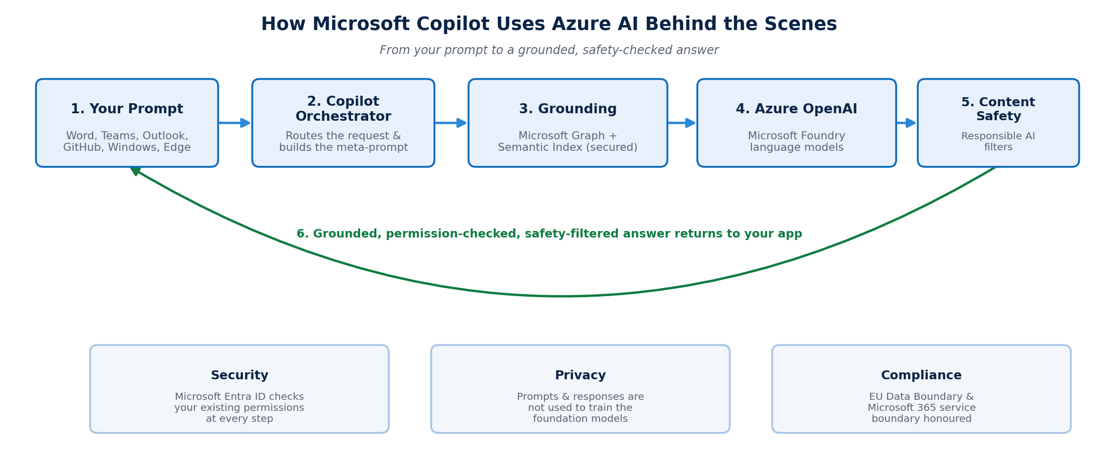
Every time you send a prompt, Copilot runs through a six-step pipeline. Understanding it demystifies both what Copilot can do and why it sometimes can’t see the file you expected it to.
Step 1 — Your Prompt Leaves the App
When you type a question into Word, Teams, Outlook or Copilot Chat, the app packages your input together with light context the open document, the current thread — and sends it over an encrypted connection to the Copilot orchestration layer.
Step 2 — Grounding With Microsoft Graph
Before anything reaches a language model, Copilot queries Microsoft Graph for emails, files, chats and meetings you’re already allowed to see. This is called grounding, and it’s paired with security trimming: Copilot can only surface data covered by your existing permissions, so it never shows you a document you couldn’t already open yourself. You can read Microsoft’s own explanation of this process on Microsoft Learn’s semantic index documentation.
Step 3 — The Semantic Index Adds Meaning
Microsoft 365 also maintains a semantic index — a vectorised map of your organisation’s content. Rather than matching only exact keywords, it captures meaning and nearby concepts, so a search for a colleague who “praised” a vendor can also surface messages that said “impressed” or “thrilled.” This is what lets Copilot feel like it understands your question rather than just scanning for a literal phrase.
Step 4 — Azure OpenAI Service Generates a Response
Copilot now assembles what’s often called a meta-prompt: your original question, plus the grounded snippets from Graph and the semantic index, plus system instructions that define tone and guardrails. That combined package is sent to a large language model hosted in Azure OpenAI Service, inside Microsoft Foundry. This is the moment Azure AI actually generates language — the model reasons over everything it has been given and drafts a response.
Step 5 — Azure AI Content Safety Filters the Output
Before the draft response goes anywhere, Azure AI Content Safety screens both the original prompt and the generated answer for hate speech, violent or self-harm content, prompt injection and jailbreak attempts. Anything that breaches an organisation’s configured thresholds can be blocked, redacted or flagged rather than shown to the user.
Step 6 — A Grounded Answer Returns to Your App
The filtered, grounded answer streams back into Word, Outlook, Teams or Copilot Chat often with citations linking to the specific email, file or chat message it drew from, so you can verify the source yourself rather than taking the answer on faith.
Beyond Microsoft 365: Copilot Across the Microsoft Ecosystem
The same Azure AI backbone shows up under several different product names, each tuned for a different audience.
GitHub Copilot
Originally introduced as an AI pair programmer, GitHub Copilot runs on Azure-hosted models to suggest code, catch errors and explain unfamiliar code as developers type.
Microsoft Copilot Studio
Copilot Studio lets organisations build their own copilots and agents on top of Azure OpenAI Service and Azure AI Search. It uses retrieval-augmented generation (RAG) to answer questions from company data, delivered through Azure Bot Service into Teams, websites and other channels.
Security Copilot
Security Copilot pairs Azure AI language models with Microsoft’s threat-intelligence signals to help security analysts investigate incidents faster. Alongside Microsoft Foundry Models, it has achieved ISO/IEC 42001 certification for responsible AI management.
Copilot in Azure
Copilot in Azure helps engineers design, operate and troubleshoot cloud infrastructure. It draws on the Azure control plane and resource insights not just a generic language model so its suggestions are grounded in the actual state of your subscription.
Data Privacy: Does Azure AI Train on Your Prompts?
This is the question every CISO asks first, and the answer is consistently no. Microsoft states that prompts and responses are not used to train, retrain or improve the underlying foundation models. Tenant data stays inside the Microsoft 365 service boundary and, for EU-based organisations, inside the EU Data Boundary. Microsoft Entra ID enforces identity and permissions at every step, Microsoft Purview applies data-loss-prevention rules, and Microsoft Defender for Cloud monitors for unusual or malicious activity across the AI pipeline.
Why Understanding This Architecture Matters for Your Career
Knowing how Microsoft Copilot uses Azure AI is quickly becoming baseline knowledge for IT professionals, project managers, sales teams and business analysts alike — and it starts with understanding Azure fundamentals: compute, storage, identity, security and pricing. That is exactly what the Microsoft Azure Fundamentals (AZ-900) exam covers, and it’s the reason so many professionals use it as their first step into the Azure ecosystem.
Where to Learn Azure AI and Copilot Fundamentals in Australia
az900.com.au runs instructor-led AZ-900 Certification Training designed for complete beginners, with flexible full-time, part-time evening and weekend timings. Courses run face-to-face and live online across Melbourne, Sydney, Brisbane, Perth, Adelaide and Canberra, with in-house training available for teams anywhere in Australia. See the full list of training locations, browse answers to common questions on the AZ-900 certification FAQ page, or contact the team to enquire about group training.
Frequently Asked Questions
Does Microsoft Copilot use ChatGPT?
Not directly. Copilot uses GPT-family models delivered privately through Azure OpenAI Service rather than the public ChatGPT product, so enterprise prompts stay inside Microsoft’s compliance and data-residency boundaries.
What is “grounding” in Microsoft Copilot?
Grounding is the process of enriching your prompt with relevant, permission-checked organisational data from Microsoft Graph and the semantic index before it’s sent to the language model, so answers reflect your actual files and conversations instead of generic knowledge.
Is Microsoft Foundry the same as Azure OpenAI Service?
Azure OpenAI Service is the model-hosting layer inside the broader Microsoft Foundry platform (formerly Azure AI Foundry), which also bundles AI Search, Content Safety and governance tooling into one control plane.
Can Copilot see files I don’t have permission to open?
No. Security trimming means grounding only ever surfaces content already covered by your existing Microsoft 365 permissions Copilot cannot elevate its own access based on a prompt.
Do I need to know Azure to use Copilot well?
Not for everyday use, but understanding core Azure concepts covered in the AZ-900 course helps you use Copilot more effectively, ask better questions and troubleshoot when an answer looks off.
Final Thoughts
How Microsoft Copilot uses Azure AI behind the scenes comes down to one idea: grounding plus generation plus safety, running in sequence, every single time you press Enter. Microsoft Graph and the semantic index find what’s relevant, Azure OpenAI Service inside Microsoft Foundry generates the language, and Azure AI Content Safety checks the result before you ever see it. Understanding that pipeline is the difference between using Copilot casually and using it with confidence and it’s a great reason to build a solid Azure foundation with an AZ-900 Certification course near you.